Audio player
Every call can be played back with the floating audio player (opened from the ▶ Play button). It starts as a small panel in the corner and can be expanded to a full player.
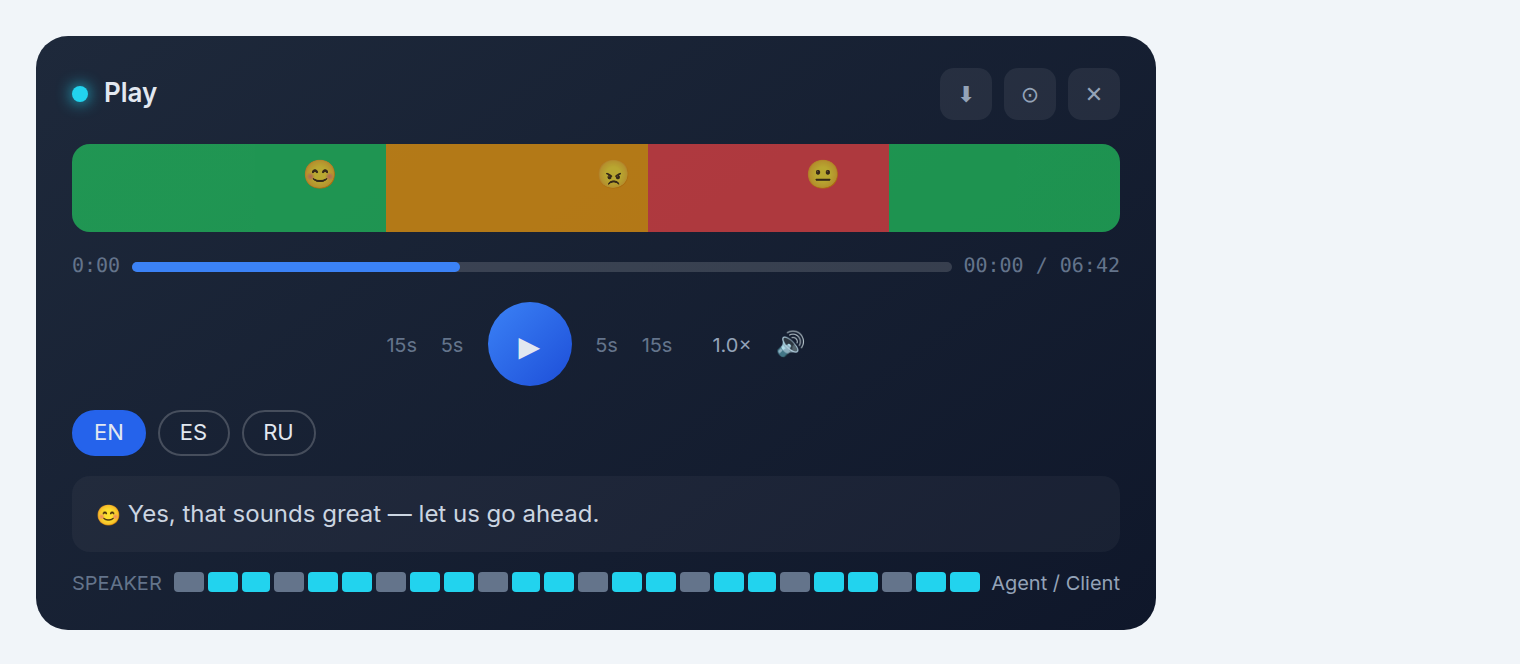
Playback controls
- ▶ Play / pause — the central button.
- Skip — jump ±5 seconds or ±15 seconds to re-listen to a moment.
- Seek bar — drag to any point in the call, with the current time / total duration shown.
- Speed — change the playback speed to skim long calls.
Volume & download
- Volume — adjust the playback loudness.
- Download — save the recording locally.
Window controls
- Minimize — collapse the player to its corner panel.
- Expand — open the full-size player overlay.
- Close — close the player.
Waveform
The waveform shows the audio energy over time and is clickable — click anywhere to jump there. Colored segments mark the client's emotion at each moment.
Subtitles & language
The player shows the call transcript as subtitles, synced to the audio. Switch the subtitle language with the language pills (EN / ES / RU, plus the detected language).
Emotion markers
As the call plays, emoji markers appear on the waveform and subtitle track showing the client's emotion (😊 positive, 😠 frustrated, etc.) at each moment — so you can jump straight to the emotional highs and lows.
Speaker indicator
A speaker bar shows who is talking — the agent or the client — so you can see at a glance how much of the call was agent-talk vs client-talk.
Open the player and the analysis side-by-side: click the emotion markers to jump to the exact moments that caused a violation or low score.